QR-Code Integration in MFG
Objective
Implement QR code-based tracking across all inventory transactions without altering the existing stock flow. This will improve traceability and stock reconciliation. seprate log for subtransaction disable grnids, what is grns got deleted
📦 Handling Existing Stock
Step 1: Determine the Number of Packets per Item
For each item in the inventory, we need to determine how many physical packets or units are currently available. This step is essential as the QR codes will be generated and assigned based on these individual packets.
Step 2: Calculate Closing Stock Quantity as of 30-Sep-2025
Before QR code tracking begins (starting from 1-Oct-2025), we must calculate the closing stock for each item as of midnight on 30-Sep-2025. This stock quantity will be treated as the opening balance in the new QR-based system.
Step 3: Insert Records into New QR Table
After calculating the stock quantities:
For each item, we will insert a record into a new QR stock table currently taking as
QRStockThis table will contain only:
Unit
Stage
Brand
Item State
Qty
Store
Item Id
Notes
The balance quantity of the item as on 30-Sep-2025
Year Label
No of Packtes
Trnid
Newly generated S-TrnIdsInd, docno, docdate, PartyId that we can exclude in this new table
---creating mfg stock table
CREATE TABLE QRStock
(
    id INT PRIMARY KEY IDENTITY(1,1),
    unitcode     NVARCHAR(2),
    stagecode    NVARCHAR(2),
    brandid      NVARCHAR(3),
    itemstate    NVARCHAR(1),
    qty          NUMERIC(14,3),
    storecode    NVARCHAR(2),
    itemid       NVARCHAR(50),
    notes        NVARCHAR(250),
    yearlabel    NVARCHAR(7),
    NoOfPackets  INT
    Trnid        NVARCHAR(7)
);

----insert from stock_qty
INSERT INTO QRStock (unitcode, stagecode, brandid, itemstate, qty,
storecode, itemid, notes, yearlabel, noofpackets)
SELECT unitcode, stage, brandid, itemstate, qty,
storecode, itemid, notes, yearlabel, @noofpackets
FROM stock_qty;

-- need to add query for updating S-TrnIds

---stock index
SELECT Unitname, stagename, brandname,
IIF(itemstate = 'R', 'Rejected', 'Good'), qty, storename,
itemname, notes, yearlabel, noofpackets,trnid
FROM QRStock M
LEFT JOIN company1 C1 ON M.unitcode = C1.UnitCode
LEFT JOIN Stages S ON M.stagecode = S.stage
LEFT JOIN brandmst B ON M.brandid = M.brandid
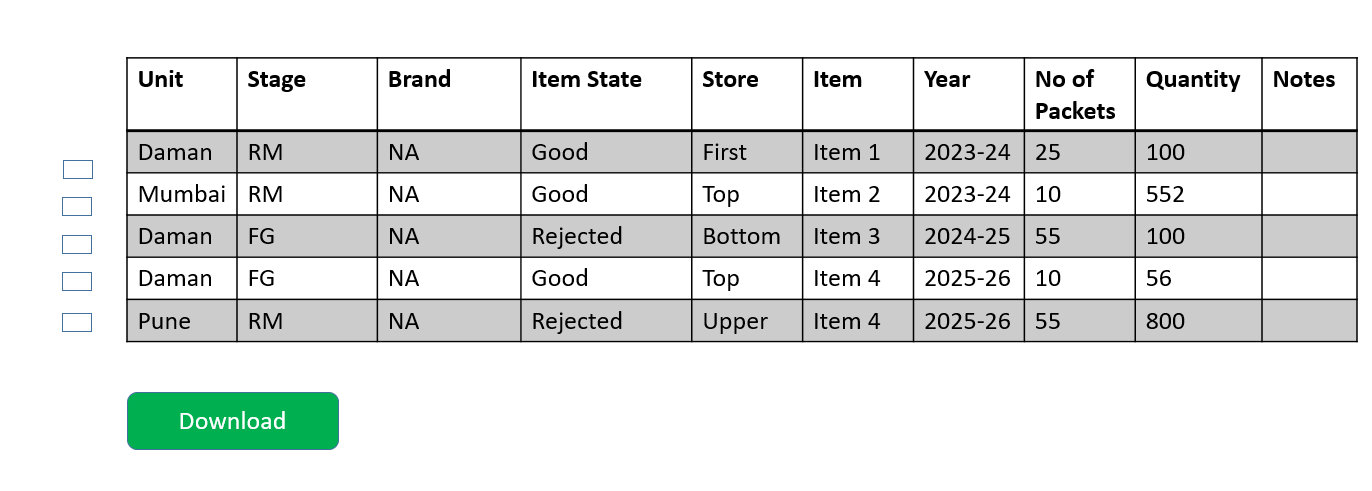
Step 4: Generate and Print QR Codes
- We will give them an Index Page where all records from
QRStockswill be there - On Index page we will have a download button
- We will give them checklist on Index page, they have to select number of records and then Print
- When they will select the records at that time as per no of packets we will insert record in
MFGSubTrnand generate TrnId,SubTrnId and then Print the records - Once QR is printed we will not allow them to Print again
Validation for Stock Printing
- If for the selected records no of sub trnids exceeds nore than 300 then we can give validation
- If they are clicking on download and no records they have selected then we can validate
- If Selected records are already printed then we can validate
Post-QR Implementation Transaction Flow
General Rules
TRN ID Creation: Only at line level for:
- GRN (Raw Material receipt) →
G-TRNID - Jobwork IN (without GRN) →
J-TRNID - IIRS Receipt (FG back to store) →
M-TRNID
- GRN (Raw Material receipt) →
No New TRN IDs: For SRN (Sales Return Note), DNCN (Debit/Credit Notes), Invoice → only update existing TRN IDs.
Sys Parameters:
- Only insert in
MFGSubTrnifEnableQRCode = Y. - Update stock only if
UpdateStockQty = Y.
- Only insert in
Data Recorded in
MFGSubTrn:Trn IdSub Trn IdActualQty(original qty)BalanceQty(remaining qty after issues/returns)IsPrinted
1. GRN (Raw Material Inflow)
The journey always starts with Goods Receipt Note (GRN) when raw materials are purchased. Each GRN line creates a G-TRNID only if sysparameter is on and
- What happens:
- System asks for Packet Nos at line level creation
- If GRN Qty is 1025 and no of packets is 11 so there will 11 subtrnids, 10 with 100 qty and 1 with 25 qty
- System generates TRN ID:
G-000001(line level). and stores it in GRN1 table - Entry inserted into
MFGSubTrn. ActualQty= quantity received.BalanceQty= available qty (changes when consumed, returned, or adjusted).- If Service GRN → no TRN ID.
- Rejected Qty we will no insert in MFGSubTrn so if Accepted qty is 100 and received is 200, then only accepted qty will get inserted in MFGSubTrn
- Once QA is done only then label can be printed
Example 1:
Vendor supplies 1000 steel rods.
| TRN ID | Sub Trn Id | ActualQty | BalanceQty | Is Printed |
|---|---|---|---|---|
| G000001 | 001 | 100 | 100 | Y |
| G000001 | 002 | 100 | 100 | Y |
| G000001 | 003 | 100 | 100 | Y |
| G000001 | 004 | 100 | 100 | Y |
| G000001 | 005 | 100 | 100 | Y |
| G000001 | 006 | 100 | 100 | Y |
| G000001 | 007 | 100 | 100 | Y |
| G000001 | 008 | 100 | 100 | Y |
| G000001 | 009 | 100 | 100 | Y |
| G000001 | 010 | 100 | 100 | Y |
| G000001 | 011 | 25 | 25 | Y |
2. IIRS (Internal Issue & Return Slip)
IIRS is the heart of internal stock control. It has two directions: Issue (O-type) and Receipt (I-type).
(a) IIRS Issue (O-type)
What happens:
- RM issued to shopfloor (consumption for manufacturing).
- System reduces BalanceQty of the linked
G-TRNID. - No new TRN ID created.
- Ensures traceability: which GRN lot got consumed.
Example 2 (Issuing 800 RM units):
| TRN ID | Module | ActualQty | BalanceQty | Remarks |
|---|---|---|---|---|
| G-000001 | GRN | 1000 | 200 | 800 issued to shopfloor |
(b) IIRS Receipt (I-type)
What happens:
- Shopfloor returns finished goods (FG) or semi-FG to store.
- System generates new TRN ID: M-000001.
- Represents FG inflow from production.
Example 3 (FG Receipt):
Out of 800 RM issued, production yields 750 FG.
| TRN ID | Module | ActualQty | BalanceQty | Remarks |
|---|---|---|---|---|
| M-000001 | IIRS-IN | 750 | 750 | FG received from production |
3. Jobwork (Subcontracting Flow)
Jobwork handles subcontractor processes.
(a) Jobwork OUT
What happens:
- RM issued to subcontractor.
- Stock reduced from linked
G-TRNID. - No new TRN created.
Example 4 (Sending 100 units to jobworker):
| TRN ID | Sub Trn Id | ActualQty | BalanceQty | Is Printed |
|---|---|---|---|---|
| G000001 | 001 | 100 | 0 | Y |
(b) Jobwork IN (without GRN)
What happens:
- Finished items received from subcontractor.
- New TRN ID with prefix J-000001 created.
- Need to ask no of packets here also if ActualQty is 150 and no of packets is 2 then it will
Example 5 (Receiving 150 items from jobworker):
| TRN ID | Sub Trn Id | ActualQty | BalanceQty | Is Printed |
|---|---|---|---|---|
| J000001 | 001 | 75 | 75 | Y |
| J000001 | 002 | 75 | 75 | Y |
4. Invoice (FG Outflow / Sales)
Invoices represent sale of finished goods. When Invoice is created we will store M-Trnids from IIRS in them.
What happens:
- FG stock reduced from linked M-TRNID.
- Traceability: which batch of FG was sold.
Example 6 (Selling 700 FG units):
| TRN ID | Module | ActualQty | BalanceQty | Remarks |
|---|---|---|---|---|
| M-000001 | IIRS-IN | 750 | 50 | Balance reduced due to Invoice issue |
👉 After invoice, only 50 FG left in store.
5. SRN (Sales Return Note)
SRN handles adjustments. No fresh TRN ID is created. It updates BalanceQty of existing TRN IDs.
Cases:
- Received From Party (Jobwork) → increase in
J-TRNID. - Received From Party (GRN) → increase in
G-TRNID. - Return to Vendor → decrease in
M-TRNID. - Found OK / Scrap / Repair → adjust
M-TRNID.
6. DNCN (Debit / Credit Notes)
Debit and Credit Notes adjust stock financially and quantitatively. They don’t create new TRNs — only modify balances of existing TRNs.
Rules:
- SDN (Sales Debit Note) → reduce BalanceQty of
M-TRNID. - SCN (Sales Credit Note) → increase BalanceQty of
M-TRNID. - PDN (Purchase Debit Note) → reduce BalanceQty of
G-TRNID. - PCN (Purchase Credit Note) → increase BalanceQty of
G-TRNID.
Example 9 Customer returns 100 FG (due to quality issue).Created a Sales Credit Note
| TRN ID | Module | ActualQty | BalanceQty | Remarks |
|---|---|---|---|---|
| M-000001 | IIRS-IN | 750 | 150 | FG increased in stock |
Negative Stock Index
In QR system, negative stock should not exist anymore, because every issue must point to a TRN and cannot exceed its balance.
Actual Changes in Branch (QR Code Stock Flow)
GRN (Goods Receipt Note)
Schema Change
- Add a column
G-TrnIdinGRN1table (line-level unique transaction reference).
- Add a column
UI Change – GRN1 Create
- Add a field “No. of Packets” (enabled only if
EnableQRCode = Yand the GRN is not a Service GRN).
- Add a field “No. of Packets” (enabled only if
Logic for QR Packets
If Qty =
1025and No. of Packets =11, then system generates 11 SubTrnIds:- 10 packets × 100 Qty each.
- 1 packet × 25 Qty.
Insertion in MFGSubTrn
- On GRN save, system generates G-TrnIds and inserts them in
MFGSubTrn.
- On GRN save, system generates G-TrnIds and inserts them in
Rejected Qty Handling
- If Rejected Qty is there then there will no insertion in MFGSubTrn
QR Code Print
Provide option to Print QR in:
- GRN Details Page (print all packets of a GRN).
- GRN Line Details Page (print individual packet QR).
Pending / Deletion Rule
If a GRN is deleted →
*If G-TrnId is not linked only then we will allow to delete GRN and also delete in MFGSubTrn
IIRS (Internal Issue & Return Slip)
Schema Change
- Add a column
M-TrnIdinMirs1table.
- Add a column
Material Movement – Issue (O-Type)
- Line-level Import Option: Users upload Excel containing scanned GRN QRs.
- Import Option page will ask for Machine, Process, Shift selection.
- Stage, Item, Brand, Store will be auto-fetched using G-TrnIds.
Updating Stock
- On Import → system reduces BalanceQty in
MFGSubTrn
- On Import → system reduces BalanceQty in
Multiple Imports Allowed
- For Issue, allow Import even if line records already exist.
Material Movement – Receipt (I-Type)
- For Receipt, user can still create records manually like before
- Adding a field “No. of Packets” in case of Receipts
- System generates M-TrnIds and inserts them into
MFGSubTrn.
QR Code Print
Provide option to Print QR in:
- IIRS (Mirs) Details Page.
- Line-level Details Page.
Pending / Deletion Rule
- If IIRS is not authorized, still allow stock movement (important for QR traceability).
- If IIRS is deleted before authorization → update/reverse related stock in
MFGSubTrn.
Jobwork
Schema Change
- Add a column
J-TrnIdinJobWork1table.
- Add a column
Jobwork OUT
- On OUT → system reduces BalanceQty from related G-TrnIds for all lines along with subtransactions.
Jobwork IN (without GRN)
- Adding a field “No. of Packets” in case of Jobwork In(Without GRN)
- On IN → system generates new J-TrnIds and inserts into
MFGSubTrn.
QR Code Print
Provide QR print option in:
- Jobwork Details Page.
- Jobwork Line Details Page.
Pending
- For deletion (reverse stock like GRN/IIRS).
SRN (Sales Return Note) need to discuss for SRN and DNCN
Update Rules in
MFGSubTrn:- Received from Party (Jobwork) → increase
J-TrnId - Received from Party (GRN) → increase
G-TrnId - Return to Vendor → reduce
M-TrnId - Found OK / Scrap / Repair → adjust
M-TrnId
Import Option only if stocks needs to be updated
- In SRN Import page, we can give then options for transaction Type
- They will upload the scanned QR excel we can fetch Item, qty, brand,state… other details and create Record for SRN
- After Importing need to add command for updating records in MFGSubTrn
- Need to update even when they Modify Records and update actual qty
- Received from Party (Jobwork) → increase
Pending
- Deletion handling.
DNCN (Debit / Credit Notes)
Update Rules in
MFGSubTrnif Update Stock is selected as Yes- SDN (Sales Debit Note) → reduce BalanceQty of
M-TrnId - SCN (Sales Credit Note) → increase BalanceQty of
M-TrnId. - PDN (Purchase Debit Note) → reduce BalanceQty of
G-TrnId. - PCN (Purchase Credit Note) → increase BalanceQty of
G-TrnId. - In Dncn we are asking if it is partial or Full, in case of Full for all the lines TrnIds along with Subtransactions will get updated in case of partial it will update only for one line.
- SDN (Sales Debit Note) → reduce BalanceQty of
Pending
- Deletion handling.
Invoice
UI Enhancement
- In
InvoiceCreateFromOrder:
- In InvoiceCreateFrom Order we will add a textbox like Daily Production Monitor and as soon as M-Trind is scanned Stage and Store will be fetched
- In
Invoice1Create:
- In Invoice1Create Order we will add a textbox like Daily Production Monitor and as soon as M-Trind is scanned Stage,State,Store, No of Packets will be fetched
Need to ask for packing slip
- In
Stock Update
- On Invoice Save → system reduces
BalanceQtyin relatedM-TrnIds.
- On Invoice Save → system reduces
Pending
- Need to think more about how we allow to link Partial M-Trnids also.
- Deletion Logic
Other Changes
Log Table
- Create
MFGSubTrnLogto record every change inMFGSubTrn:
- Create
Print Service
- A single Print method for all modules (like DPR) to generate QR labels.
Update Service
- A single Update method for handling stock updates in
MFGSubTrn(instead of writing module-specific queries).
- A single Update method for handling stock updates in
Physical Stock Verification
- Physical Stock Verification will be more easier after QR
- User just have to scan the QR and all the details will automatically appear in Excel
- They have to enter separately for loose packets